
Note: This article can change without notice!
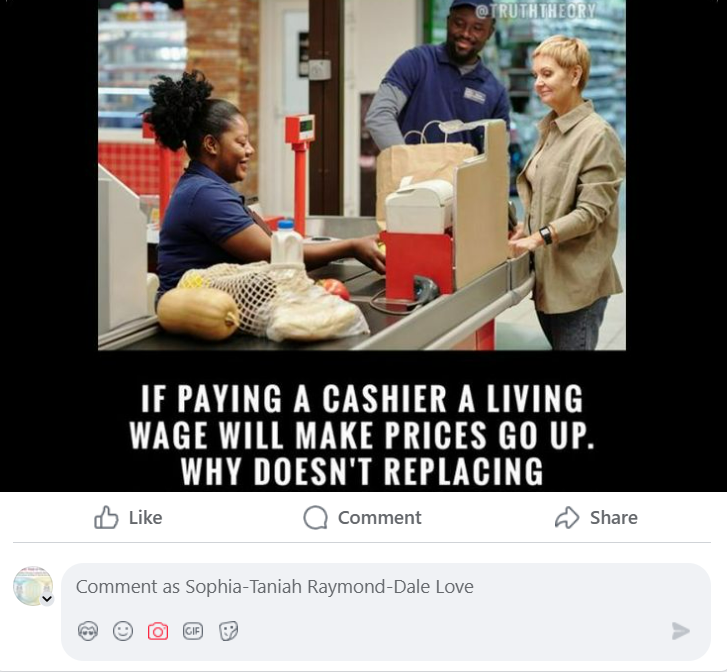
While on Facebook today, I read a meme that was shared. I wanted to share my insights about what I read but when I went to add a comment I was blocked. I’ve sent previous notices to Facebook on other issues so I decided to respond to the restrictions because I am tired of being discriminated against and from where I sit none of my ideas and or images shared violates community standards as indicated. The post and my actions are enclosed below:
I decided to ask for assistance from ChatGPt and asked, “What steps can I take when Facebook algorithms are set up to block me from posting inspirational and educational photos?”
ChatGPT said:
If you’re finding that Facebook’s algorithms are blocking or limiting your ability to post inspirational and educational photos, it’s likely that your content is being flagged for violating Facebook’s Community Standards, even if it’s unintentional. Facebook uses automated systems to moderate content, and these algorithms sometimes mistakenly block or restrict posts that don’t actually violate any rules.
Here are some steps you can take to address this issue:
1. Review Facebook’s Community Standards
Start by reviewing Facebook’s Community Standards to ensure that your content is fully compliant with their guidelines. Common reasons for content being flagged include:
- Hate speech: Even well-meaning posts can be flagged if they contain language that’s interpreted as offensive or discriminatory.
- Graphic or explicit content: Images that may be educational but contain sensitive material (e.g., medical imagery or images related to current events) might be flagged.
- Misinformation: Posts that are educational but convey unverified or controversial information may be blocked, especially if they’re related to health, science, or politics.
- Spammy behavior: Over-posting similar content, using too many hashtags, or repeated sharing of links or images that are flagged as spammy can trigger algorithmic restrictions.
Make sure your posts align with their guidelines. If you’re not sure why your post was flagged, reviewing their standards can give you clues.
2. Appeal the Blocked or Removed Post
If your post is flagged or removed and you believe it was done in error:
- Check for notifications: Facebook typically notifies you when content is removed or restricted. In many cases, it provides an option to appeal the decision.
- Submit an appeal: If you believe the restriction was a mistake, you can appeal the decision directly from the notification or through your Facebook Support Inbox. If the post is reviewed by Facebook and determined not to violate the standards, it may be reinstated.
- Provide context: In your appeal, you can clarify why the content is educational and inspirational and does not violate community standards. This can help human moderators understand the intent of your post better.
3. Check for Technical Issues
Sometimes, Facebook may block content due to technical reasons unrelated to the actual content:
- Content duplication: If you’re posting the same content too many times or sharing links from sources Facebook flags as spam, it might get automatically restricted.
- Low-quality images or URLs: Facebook’s algorithms can sometimes flag certain links or image types as suspicious. Ensure your images are clear and well-formatted, and use trusted, high-quality URLs.
- Content delivery: Try posting from a different device or clearing your browser cache to eliminate potential bugs or issues with the app.
4. Consider Adjusting Your Content
If your content is being flagged frequently despite following guidelines, here are some ideas to modify your approach:
- Avoid controversial subjects: Be careful about posting images or content that might touch on sensitive or controversial topics, especially if they could be misinterpreted by the algorithm (e.g., political opinions, unverified health advice).
- Alter your image text: If your text overlay is flagged, try changing the language or tone. Avoid using too many hashtags, capital letters, or phrasing that could trigger automated systems.
- Use alternative formats: If photos are getting flagged, try creating educational and inspirational videos, infographics, or slideshows, which may be treated differently by Facebook’s algorithms.
- Limit links to external sites: Posts with links, especially to external websites, can sometimes be flagged as spam. If you’re sharing educational content, try summarizing the message in the post and linking only when absolutely necessary.
5. Monitor Your Activity and Engagement
Facebook’s algorithms consider your overall engagement history:
- Consistency: Post regularly, but not excessively. Too many similar posts in a short period can make your account appear spammy.
- Engagement signals: Facebook’s algorithms consider how your content is received by others. If your followers are engaging positively with your posts (e.g., likes, shares, comments), it signals to Facebook that your content is likely legitimate.
- Avoid controversial behavior: Avoid getting involved in excessive controversy or arguments, especially in the comments. This can sometimes lead to your account being flagged or restricted.
6. Build a Positive Reputation
- Report false restrictions: If you notice repeated issues where Facebook is mistakenly blocking or limiting your content, try reporting it to Facebook through the Help Center. Over time, this can help improve the algorithm’s accuracy regarding your account.
- Engage with others: Actively engage with others’ posts in a positive way. Building a positive reputation for your account can help ensure your future posts are treated more favorably by Facebook’s systems.
7. Use Facebook Groups and Pages
If your personal profile is facing restrictions, consider:
- Creating or joining a Facebook Group: You can create a private or public Facebook group focused on education and inspiration. Groups often have different moderation settings than personal profiles, and you may find it easier to share educational content in this setting.
- Creating a Facebook Page: A business or community page may have more flexibility with posts, especially if you’re sharing educational content. Pages can be subject to different rules and moderation than personal accounts, which might help avoid restrictions.
8. Consider Using Other Platforms
If Facebook’s algorithms continue to block your content, it might be worthwhile to consider cross-posting your educational and inspirational content to other platforms, such as:
- Instagram: Owned by Facebook, but the algorithm on Instagram might treat content differently.
- LinkedIn: Especially for educational or professional content, LinkedIn might be a more receptive platform.
- YouTube: For more detailed educational content, YouTube is a great platform.
- TikTok: For shorter, engaging educational videos, TikTok might offer another outlet.
Final Thoughts:
While it can be frustrating to have content restricted or blocked, the key is to be patient and proactive. If you believe your posts are being unfairly restricted, appeal the decision and make sure your content aligns with Facebook’s guidelines. Additionally, adjusting your approach and building a positive engagement history with Facebook’s algorithms can reduce the likelihood of future issues.
4o mini
You said:
Non of my photoes fall int the catigory described.
ChatGPT said:
ChatGPT
I understand your frustration if your photos are being blocked or restricted even though they don’t fall into the categories Facebook typically flags, such as hate speech, graphic content, or misinformation. Facebook’s algorithms can sometimes be overly sensitive or make mistakes, even with seemingly innocuous content. Here are some additional steps you can take if your content doesn’t appear to violate any specific rules:
1. Check for False Positive Flags
Facebook’s algorithms sometimes misidentify benign content as violating guidelines. This can happen for a variety of reasons, even if your photos are genuinely educational or inspirational. If you believe your content is being wrongfully flagged:
- Appeal the decision: If you’ve received a notification that your post was removed or restricted, you can often appeal the decision. In your appeal, explain why the content is educational and inspirational, and that it does not violate Facebook’s Community Standards.
- Provide context: When appealing, it’s helpful to clearly describe the intention behind the post. For example, if it’s an image designed to inspire or educate about mental health, a specific social cause, or a historical lesson, explaining the intent may help the review team understand that it’s not a violation.
2. Inspect Your Content for Subtle Triggers
Even if your images don’t fall into obvious categories for content moderation, certain elements could still be misinterpreted by Facebook’s algorithms. Common triggers include:
- Text in images: Automated systems can misinterpret certain words or phrases as problematic, even when they aren’t. For example, using terms that could be associated with controversial topics (even if they’re used in a positive context) may cause your post to be flagged.
- Hashtags: If you include hashtags that are commonly associated with spammy or controversial content, your post might be flagged. Try using more specific, positive hashtags that are less likely to be flagged by automated systems.
- Image composition: Some image formats, such as those used in clickbait or meme-style content, may sometimes be misinterpreted by Facebook’s AI. Even if your content is not spammy, formatting the image in a way that mimics viral trends can inadvertently trigger moderation.
3. Check for Technical Issues or Bugs
Sometimes Facebook’s algorithm may act erratically due to technical issues or bugs:
- Upload issues: There might be a problem with the image format, file size, or resolution that causes Facebook to flag it erroneously. Try uploading your images in a different format (e.g., JPEG instead of PNG) or resizing the image to see if that resolves the issue.
- App issues: If you’re using the mobile app, try accessing Facebook through a browser to see if the issue persists. Clearing your app cache or reinstalling the app can also help resolve some bugs that might be affecting posting.
4. Build a Positive Account History
If Facebook’s algorithms are restricting your content based on an account-level evaluation (such as your account history or engagement patterns), there are a few things you can do to ensure that your content is not flagged in the future:
- Engage with your audience: Regularly engage with your followers in a positive way by replying to comments and messages, liking and commenting on other people’s posts, and sharing valuable content. This can help build a reputation as a legitimate and positive account.
- Post consistently: Avoid sudden bursts of posting the same kind of content. If you’re posting too many similar images too quickly, it can trigger automated spam filters. Posting consistently but moderately (e.g., a few times a day) can help avoid being flagged.
- Report any ongoing issues: If you continue to experience problems with your posts being blocked, you can use Facebook’s Help Center to report the issue. In some cases, escalating the problem can lead to a manual review by a Facebook support team.
5. Reach Out to Facebook Support
If your content is being blocked or restricted repeatedly and you’re confident it’s not violating any standards, you may need to get in touch with Facebook directly:
- Facebook Help Center: Use the Help Center to report issues with your account or specific posts. Provide as much detail as possible, including screenshots of the blocked posts and the reasons given for the block.
- Facebook Business Support (if applicable): If you are posting from a business page, you may be able to access additional support options through Facebook’s Business Support system.
6. Consider Creating a Facebook Page or Group
If you’re posting from a personal profile and facing ongoing issues, consider creating a Facebook Page or Group for your inspirational and educational content:
- Facebook Page: Pages have different moderation criteria than personal accounts, and may allow you to share your content with fewer restrictions, especially if your content is educational or targeted at a wider audience.
- Facebook Group: If your content is intended for a specific group of people (e.g., a community interested in a particular educational subject), you can create a Facebook Group and post your content there. Group posts may have different algorithms, and as an admin, you can also moderate posts to prevent accidental restrictions.
7. Alternative Platforms for Sharing
If Facebook continues to block your content without clear reasoning or resolution, it might be helpful to consider cross-posting to other social media platforms. Some good alternatives for educational and inspirational content include:
- Instagram: A visual-focused platform with a large audience for educational content, especially if you pair your images with detailed captions or stories.
- LinkedIn: Great for professional, educational, and thought-leadership content. It has a more tolerant approach to informative content, especially in areas related to career development, education, and inspiration.
- Pinterest: Ideal for sharing visually appealing educational content in the form of infographics, tutorials, or inspirational quotes.
- YouTube: If you’re comfortable with video content, YouTube is an excellent platform for creating more detailed educational videos or visual lessons.
8. Engage Your Audience
Encourage your audience to engage with your posts by liking, commenting, and sharing your content. Positive engagement signals can help improve your content’s reach and reduce the likelihood of it being flagged by the algorithm.
Conclusion:
If Facebook’s algorithms are blocking your posts, it’s frustrating, especially when your content is clearly positive and educational. In many cases, these blocks are the result of automated moderation systems flagging your content due to keywords, image format, or even false positives. By appealing the block, adjusting your content strategy, and building a positive account reputation, you can hopefully resolve the issue. If these steps don’t work, reaching out to Facebook directly for support is your next best option.
4o mini
You said:
I never received a message or notification it is just blocking me
ChatGPT said:
ChatGPT
If Facebook is blocking your posts without giving you a clear notification or message about why it’s happening, it’s likely an issue with Facebook’s automated systems (algorithmic moderation) mistakenly flagging your content. This can be especially frustrating when you’re not sure why it’s happening or how to resolve it.
Here are a few steps you can take to investigate and address the issue:
1. Check Your Post Visibility Settings
Sometimes, posts may appear to be blocked or restricted without any clear notification due to privacy settings or visibility restrictions:
- Check post visibility: Ensure your posts are set to be visible to everyone (or at least to your intended audience). If they’re set to “Only Me” or a specific group, it might seem like the post is being blocked when it’s simply not being shared with others.
- Check audience settings: If you are posting something that could be flagged for sensitive content, Facebook may automatically limit the audience to only certain people (like your friends or followers). Double-check that you haven’t inadvertently selected a restricted audience.
2. Review Facebook’s Help & Support for Blocked Content
Even if you’re not receiving notifications, there’s a chance Facebook is silently limiting your post reach or flagging your content under “Page Quality” settings (for business pages) or content restrictions on personal accounts. Try these steps:
- Access the Help Center: Go to the Facebook Help Center and search for information on post restrictions. You can sometimes find alerts related to restrictions on your account or posts in the “Support Inbox” or “Account Quality” section.
- Check “Account Quality” (for Pages): If you’re posting from a Page, you can find an Account Quality section under the page settings that outlines any restrictions on your content. Facebook may not send individual notifications for every restriction, but you may see warnings or issues listed here.
- Review any recent content moderation: Even if you’re not receiving messages about specific posts being blocked, you may be able to see a history of your content being flagged or restricted through the Facebook interface.
3. Test Different Content or Formats
If Facebook is blocking your posts without notifying you, the algorithm may be flagging certain types of content mistakenly. Here’s what you can try:
- Experiment with different types of posts: If your photos are being blocked, try posting text-only updates or links to external educational sites to see if that’s flagged.
- Use varied image formats: If you’re using specific types of images, try changing the format (e.g., using JPEG instead of PNG) or simplifying the design (avoiding text-heavy images) to see if it resolves the issue.
- Avoid hashtags: If you’re using hashtags in your posts, try removing them, as sometimes they can trigger flags due to associations with spamming or controversial content.
- Post without URLs: Sometimes, Facebook blocks posts that contain external links (even if they lead to educational sites) because they are often associated with spam or clickbait. Try posting without links to see if that resolves the issue.
4. File an Appeal or Report the Issue
If the problem persists, even without notifications, here’s how you can proactively report the issue:
- Use the “Report a Problem” feature: Facebook has a “Report a Problem” option that lets you submit an issue if you’re experiencing problems with posts being blocked. You can find this option under the menu on your mobile app or the desktop website. This may not directly address specific blocked posts but could help bring attention to the problem.
- File a general complaint: Use the Help Center or Support Inbox to report your issue and explain that your posts are being blocked without receiving any notification. While Facebook doesn’t always respond immediately, they do review user complaints and sometimes make adjustments based on recurring issues.
5. Monitor Your Account for Suspicious Activity
In some cases, Facebook might automatically restrict certain accounts due to unusual activity or if they suspect a security issue:
- Check for any account compromises: Ensure your account hasn’t been compromised or hacked. Look for any unusual activity in your Facebook settings (like unfamiliar logins or security alerts).
- Review any recent changes: If your account recently underwent any changes, such as a name change or a shift in posting behavior, that might cause Facebook’s automated systems to flag you as suspicious.
6. Check Your Account and Content History
Facebook’s algorithm may automatically limit your account based on its history of posts:
- Review your content: If you’ve posted content that’s been flagged in the past (even if it was a mistake), Facebook may be applying extra scrutiny to your current posts. This could lead to more frequent restrictions.
- Review any prior warnings or restrictions: While you may not have received individual notifications, Facebook may have issued previous warnings or soft restrictions (like limiting your post reach or audience) that weren’t directly communicated to you.
7. Engage with Your Facebook Audience
Engagement with your posts can signal to Facebook that your content is positive and genuine:
- Encourage positive interactions: The more people engage with your content (liking, commenting, sharing), the more likely Facebook’s algorithms are to recognize your posts as non-problematic. If your posts are consistently well-received, the likelihood of them being flagged by the system is reduced.
- Use Facebook Groups or Pages: If you’re posting from a personal account, consider creating a Facebook Group or Page. These may offer more flexibility and could potentially bypass some of the algorithmic issues faced by personal profiles.
8. Alternative Ways to Share Content
If you’re continuously facing issues posting on Facebook, and none of the above steps help resolve it, you may want to consider:
- Cross-posting: Share your inspirational and educational photos on Instagram, LinkedIn, or Pinterest—platforms that are also well-suited for visual content. They offer different moderation algorithms that may not block your content as Facebook does.
- Try using Facebook’s “Stories” feature: Sometimes posts in Facebook Stories are treated differently by the algorithms, and using that feature can bypass some restrictions.
- Build your own website/blog: If you share educational content regularly, consider creating a blog or website where you can host your content freely without algorithmic restrictions. You can then share the link on Facebook (as long as it’s from a reputable source).
Conclusion:
If you’re experiencing this kind of issue, it’s likely caused by an overzealous algorithm that is mistakenly flagging your content. While Facebook doesn’t always provide clear reasons for such actions, you can appeal the decision, experiment with different types of content, and report the issue directly to Facebook. In the meantime, you might also want to consider alternative platforms for sharing your photos and content. If you’re consistent with appealing and adjusting your posts, you may eventually get the algorithm to work in your favor.
4o mini
You said:
I wish to write a notice to inform the facebook administrators that I am being dicriminately blocked for posting my educational material I am providing for free. Can you assist me in writing a Notice of Discrimiantion?
ChatGPT said:
ChatGPT
Certainly! Writing a clear and professional Notice of Discrimination to Facebook’s administrators is an important step in addressing any concerns you have about being unfairly blocked or restricted. In this notice, you’ll want to clearly outline the issue, explain how it has impacted your ability to share educational content, and ask for a review of the situation. Below is a template that you can use to write your notice:
Subject: Notice of Discrimination and Request for Review of Account Restrictions
Dear Facebook Support Team,
I hope this message finds you well. I am writing to formally address an ongoing issue that I believe is a case of discriminatory restriction on my account, in which my educational content is being blocked or restricted without any clear or valid explanation. I am posting educational material that is intended for the benefit of the community and is being provided free of charge, with the aim of informing, inspiring, and educating my audience on important topics.
Background:
Over the past [insert time period], I have been actively sharing educational materials in the form of images, photos, and text-based content related to [briefly describe the subject of your educational content, e.g., mental health, history, science, social issues, etc.]. However, despite my content aligning with Facebook’s Community Standards and Guidelines, I have found that my posts are frequently blocked or restricted without receiving any notification or valid reason for the restrictions.
I have reviewed Facebook’s Community Standards, and none of my posts appear to fall under the prohibited categories of hate speech, graphic content, or misinformation. My content is strictly educational and meant to inspire and inform, often in the form of factual information, educational graphics, or uplifting quotes. Given this, I believe that my posts are being unfairly blocked or restricted, and I am concerned that this action may be discriminatory in nature.
Request for Action:
I respectfully request a thorough review of the restrictions placed on my account, as well as any posts that have been blocked or flagged. I would like to understand the specific reasons for these actions and ask for a reevaluation of the automated algorithms that may be mistakenly flagging my content.
If my posts are being flagged for reasons related to the format, content, or specific language used, I kindly ask for clarification and an opportunity to correct any issues that may have been inadvertently flagged.
Request for Non-Discriminatory Treatment:
As a user of your platform, I trust that Facebook is committed to fairness and non-discriminatory practices for all content creators. However, I feel that my educational content may be unfairly treated compared to other types of content on the platform. I ask that you ensure that content, especially that which is educational in nature, is evaluated in a consistent and equitable manner, without bias or overzealous moderation.
Additionally, I would appreciate the opportunity to engage in dialogue with your team if there are any concerns about my content that need to be addressed. I am more than willing to adjust my posts if necessary, but I would like to better understand the rationale behind the restrictions I am experiencing.
Conclusion:
I value the opportunity to share educational content with others on Facebook, and I would like to continue doing so without experiencing undue hindrances. I look forward to your prompt attention to this matter and to a resolution that allows me to share my content without further discrimination or undue restriction.
Thank you for your time and consideration. I await your response and hope we can resolve this issue quickly.
Sincerely,
[Your Full Name]
[Your Facebook Profile Name]
[Your Email Address or Contact Information]
[Your Facebook Page Name (if applicable)]
Key Points to Consider When Sending the Notice:
- Clear and respectful tone: Always keep the tone polite and professional, as Facebook’s moderation team is more likely to respond positively to clear, reasoned communication.
- Specific details: Include details like how long the issue has been happening and what specific content has been blocked or restricted (without including the exact posts themselves, unless you want to share that).
- Request clarification: Ask for an explanation of the specific reasons behind the restrictions and for a review of the content.
- Non-discrimination: Emphasize that you are asking for fair and non-discriminatory treatment of your educational material.
How to Submit the Notice:
Once you’ve written your notice, you’ll need to use one of the following methods to submit it to Facebook:
- Report a Problem: Use Facebook’s Help Center to report the issue. You can access this by clicking the downward arrow in the top-right corner of Facebook (on desktop), selecting Help & Support, and then choosing Report a Problem.
- Support Inbox: If you’ve received any notifications about your account or posts being flagged or restricted, you may be able to reply to those messages through the Support Inbox on Facebook. This is where Facebook communicates with users about issues with their accounts.
- Business Support (for Pages): If you are posting from a Facebook Page, you may have access to additional support via Facebook Business Help. You can visit the Facebook Business Support page to submit a case for review.
- Appeal Process: If you’ve already had specific posts removed or flagged, check the Appeals Process Facebook provides when you receive a notification about your content being blocked. Sometimes, you can submit an appeal to have the decision reviewed by Facebook staff.
I hope this helps you structure your notice! If you need further assistance with refining or submitting it, feel free to reach out. Check out ChatGPT!
______________________________________________
Below is the link to the Facebook post that inspired this article and the actions I shall be taking!
Here is the link to the original post for those people that have a Facebook account!
https://www.facebook.com/photo/?fbid=9513921505302215&set=a.530794373615018
Basically, the next meme was shared on a friends page. The original post was created by the public group called “Truth Theory ” which appears to be created by people that inspire people to think outside the box. However, from what I can see they are just as misinformed as the general public.
Here is the meme shared, supporting the idea that man is supposed to stand in line and ‘pay” for ‘food” at the grocery store:
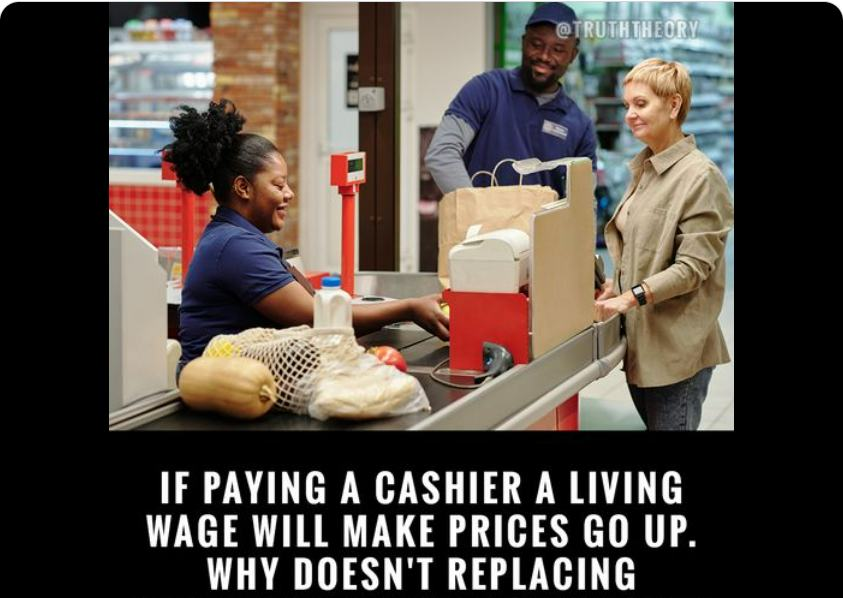
I left the next two comments and was blocked from posting a photo advertisement for a free classes called “Feed The Fam” shared on the Freedom From Government.
My first comment after reading the message above:
Reading this meme verifies to me what I realized a few years back, “they got people hoodwinked into thinking in a specific way!” I had to stop and consider, become aware of what it is I am thinking and doing if I actually wanted to be a conscious creator. It is me hat has to align my perception, my thoughts, my feelings, and my actions with the world I wished to experience!!!
What will it take for people going about their daily activity to stop and think and realize what they are accepting and advocating for?
I realized that my problem is “not knowing I am not a ‘taxpayer’ subject to a ‘price in the first place!” In order for the world to change I must change the way I perceive myself and perceive how the matrix of things operates!! I find myself asking, “who am i”
“why am i here?”
“Why am I paying for products that originally cost nothing to create?”
“If slavery, involuntary servitude, and forced labor is illegal and unlawful why am I forced to go to work to pay for the essentials of life?”.
“Why are there all these people sharing this meme unaware of that they are condoning because of their lack of education?”
“It will be beneficial for each of us to gain the eyes to see and ears to hear and the heart that knows when one is out of sink with the desires of our heart!!” [edited]
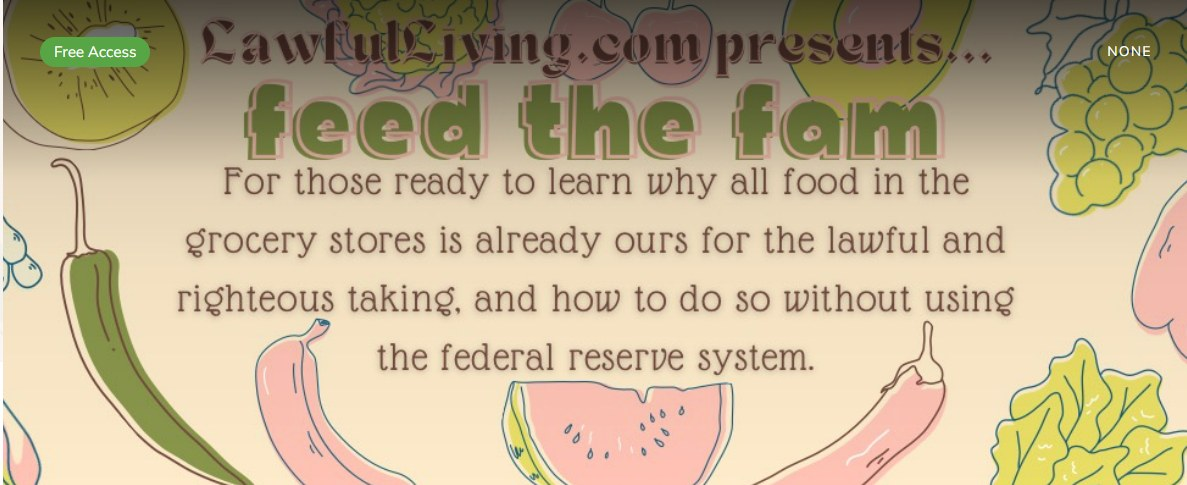
https://freedomfromgovernment.org/classes/feed-the-fam/
The photo I wanted to post to the comment above:
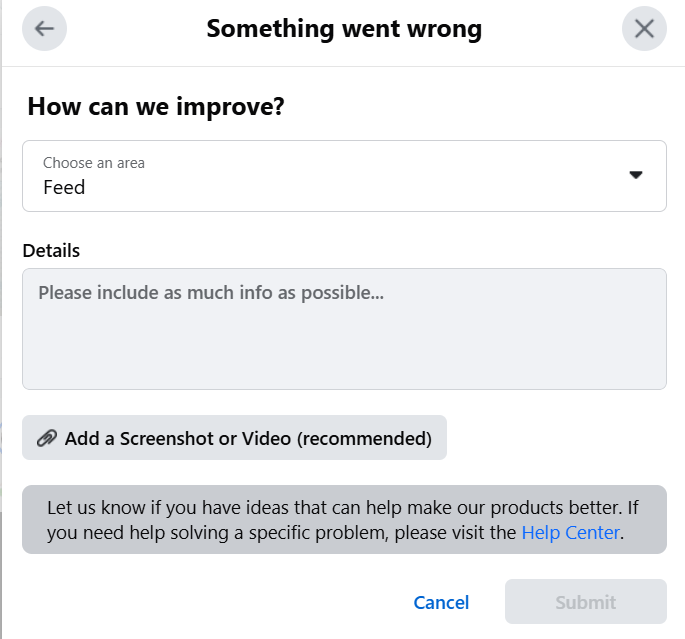
The next screenshot exposes the fact that I was being blocked from posting any photos as a comment to the post:
My second comment:
Do you know that the cash register is seen as an instrumentality of the United States and those that pay for the items are seen as importers? And is why these people are called “custom-ers”.
So, I will be writing up a Notice to take steps to resolve this issue.





Once the notice is completed and served it will be added below:
 Freedom Dove
Leave a comment